Your enterprise isn't running on a professional database. It's running on a fragile web of unmanaged spreadsheets. You must replace excel with power apps to eliminate the data silos and security risks that compromise your operational integrity. When a single accidental deletion can stall a department, your tools have become liabilities. You need a more resilient architecture.
We understand the friction of version control nightmares and the total lack of mobile access for your field teams. This migration isn't just about moving data; it's about building a centralized, secure engine for your business. Transitioning to a high-performance environment eliminates shadow IT and restores control to your leadership. You'll stop managing files and start managing outcomes.
This guide delivers the strategic framework for a successful enterprise migration. You'll learn how to transform static files into mobile-ready applications with automated workflows. We'll show you how to move from manual tracking to a scalable Microsoft ecosystem that drives tangible results and long-term stability.
Key Takeaways
• Identify the "Excel Ceiling" where spreadsheet complexity creates data silos and operational risks.
• Learn why Microsoft Dataverse is the essential foundation for secure, enterprise-grade data storage.
• Apply a strategic framework to decide when to replace excel with power apps based on user count and process complexity.
• Execute a secure transition using a phased roadmap focused on data hygiene and automated migration.
• Establish professional governance to prevent app sprawl and maintain long-term system performance.
The Breaking Point: Why Enterprises Must Replace Excel with Power Apps
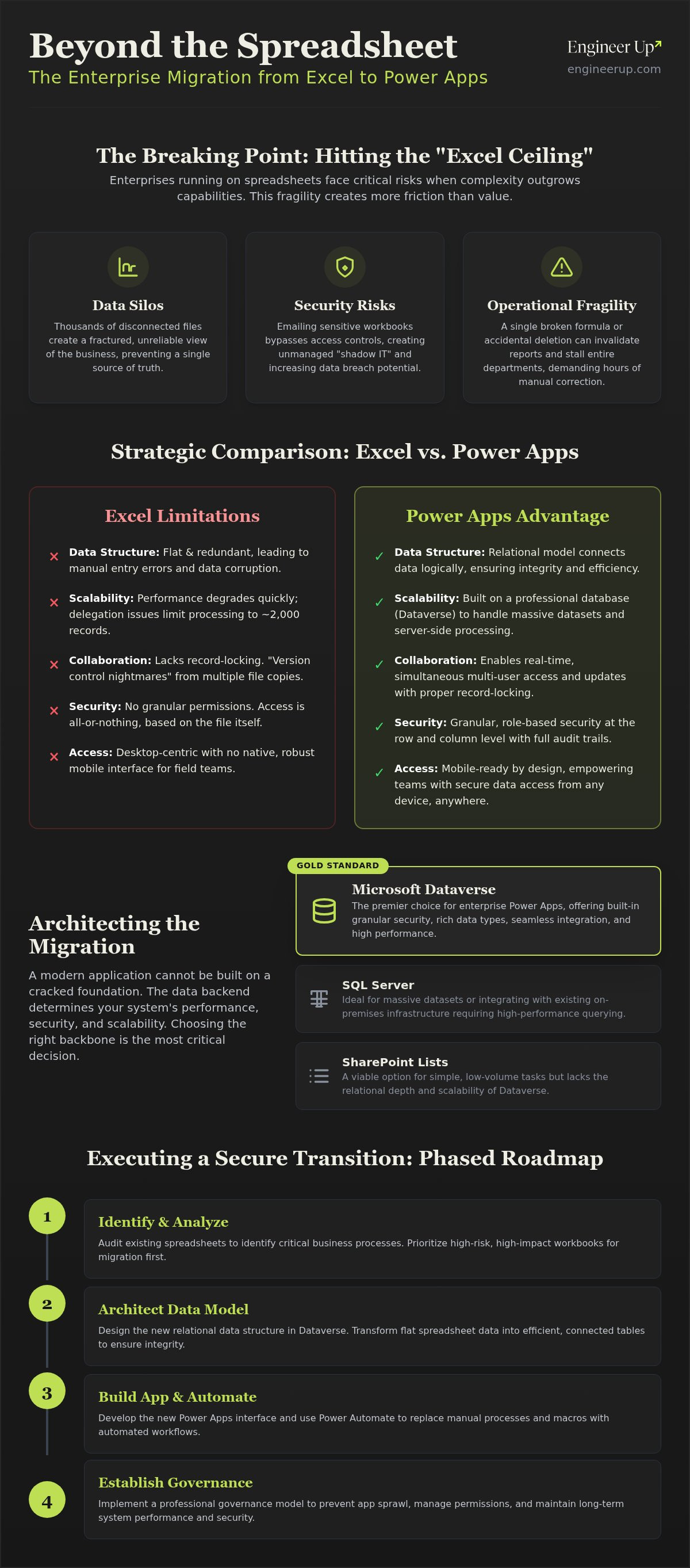
Excel is an elite calculator. It is a failing enterprise engine. Organizations eventually hit the "Excel Ceiling." This is the point where workbook complexity creates more friction than value. When your business relies on thousands of disconnected files, you lose the ability to scale. You must replace excel with power apps to move from a "calculator" mindset to a "platform" mindset. A platform provides a foundation for growth; a calculator only provides a snapshot of the past.
Static data is a strategic blind spot. Spreadsheets offer no real-time visibility and zero audit trails. You can't see who changed a value or why it happened. By leveraging business process automation services, you transform passive data into active workflows. This transition ensures your data triggers actions rather than just sitting in a cell. It moves your team from reactive data entry to proactive decision-making.
The Hidden Costs of Spreadsheet Fragility
Spreadsheets demand constant manual labor. Enterprises lose thousands of hours annually to data reconciliation and error correction. One broken formula in a hidden tab can invalidate an entire quarterly report. Security risks are equally severe. Emailing sensitive workbooks across departments bypasses all standard access controls. It's a data breach waiting to happen.
The "Key Person Risk" is perhaps the most dangerous hidden cost. Critical business logic often lives inside the head of a single analyst who built a complex macro. If that person leaves, the system collapses. Moving these processes to the Microsoft Power Platform centralizes logic and ensures operational continuity regardless of individual turnover. It builds resilience into your infrastructure.
From Shadow IT to Governed Innovation
Unmanaged spreadsheets are the foundation of shadow IT. They create data silos that your IT team cannot see, secure, or back up. These silos prevent leadership from having a "single source of truth." When you replace excel with power apps, you migrate these "underground" processes into a professional, governed environment. You gain visibility into how data is used across the entire organization.
This migration doesn't stifle creativity; it secures it. Users get the tools they need to solve problems without exposing the company to unmanaged risks. Enterprise Governance is the strategic balance between providing user agility and maintaining rigorous system security. This framework allows for rapid innovation while protecting the integrity of the enterprise data backbone.
Architecting the Migration: Choosing Your Data Backbone
Do not build a modern application on a cracked foundation. Many teams attempt to use an existing spreadsheet as the data source for their new interface. This is a stopgap, not a solution. When you replace excel with power apps, the backend determines your system's ultimate performance. Excel files lack record-locking capabilities and fail when multiple users attempt simultaneous writes. You need a professional database to ensure structural integrity.
Relational data structures are the key to enterprise scalability. Spreadsheets are inherently flat, forcing you to repeat data across multiple rows. This redundancy leads to corruption and manual entry errors. A relational model separates data into logical tables, connecting them through unique identifiers. This architecture reduces storage requirements and ensures that a single update reflects across the entire system instantly. If you need assistance defining these structures, our strategy consulting services can help align your architecture with your business goals.
Microsoft Dataverse
The gold standard for the Power Platform. It offers built-in security, rich data types, and seamless integration.
SQL Server
Ideal for organizations with massive datasets or existing on-premises infrastructure that requires high-performance querying.
SharePoint Lists
A viable option for simple, low-volume tasks, but it lacks the relational depth and delegation power of Dataverse.
Why Dataverse Wins for Enterprise Apps
Security in Dataverse is granular and robust. You can define permissions at the row and column levels, ensuring users only see the data relevant to their roles. This level of control is impossible in a shared workbook. Performance is another critical factor. Excel-based apps suffer from delegation issues, often failing to process more than 2,000 records. Dataverse handles massive datasets by offloading processing to the server. This high-speed access is a prerequisite for enterprise AI agent consulting, as intelligent agents require structured data to provide accurate insights.
Mapping Your Spreadsheet to a Relational Model
Start by auditing your current workbooks for "dead data" and broken formulas. Identify your core entities, such as Customers, Assets, or Transactions. You must normalize this information by removing redundant columns and creating dedicated tables for repeating values. This process simplifies the data model. A lean backend makes front-end development faster and reduces the likelihood of app crashes. Prioritize the data structure before you design a single screen. Logic follows data.
Strategic Comparison: Excel vs. Power Apps Framework
Migration is a strategic filter. You don't need to move every spreadsheet. You must move the ones that drive critical business operations. To decide, evaluate the friction in your current workflow. If a process requires multiple people to edit data simultaneously, Excel is the wrong tool. It lacks the record-locking capabilities needed for enterprise-wide access. You must replace excel with power apps to ensure data integrity during high-concurrency tasks.
Complexity also dictates the transition. Excel is an elite tool for ad-hoc mathematical modeling and one-off financial analysis. It fails when a process requires a multi-stage approval workflow or strict data validation. Power Apps enforces business logic at the point of entry. It ensures that every record meets your quality standards before it ever hits the database. If your team spends more time fixing formatting than analyzing data, you have reached the breaking point.
Device requirements are the final decider. Excel is a desktop-bound experience. It is cumbersome on tablets and nearly impossible to use on smartphones. If your field teams or warehouse staff need to capture data on-the-go, you must replace excel with power apps to provide a responsive, mobile-ready interface. This accessibility ensures that data is captured in real-time, directly where the work happens.
The 'Right Tool' Matrix
Excel
Best for ad-hoc analysis, personal task tracking, and one-off financial modeling.
Power Apps
Best for standardized data entry, external system integrations, and automated enterprise reporting.
The threshold for migration is clear: when a dataset exceeds 5,000 records or requires more than five concurrent users, the spreadsheet model is no longer viable.
Bridging the Gap with Power Automate
Applications don't exist in a vacuum. Utilizing power automate consulting ensures your new app connects seamlessly to legacy systems and external APIs. Automation replaces manual email reminders with logic-based triggers and actions. This transition shifts the burden of accuracy from the employee to the system. It reduces the human error factor by automating repetitive data processing tasks. You aren't just building an app; you're engineering a self-sustaining workflow that maintains high-performance standards without constant manual intervention.
Step-by-Step Roadmap: Executing a Secure Transition
Enterprise migration is not a one-click event. Microsoft's "Create from Data" feature often produces shallow applications that fail under real-world pressure. To replace excel with power apps successfully, you need a disciplined, five-phase execution plan. This roadmap ensures your new system is stable, secure, and ready for production.
Phase 1: Audit and Clean.
Identify your core data. Remove dead records and resolve broken formulas at the source.
Phase 2: Data Migration.
Use Power Query and Dataflows to map your cleaned Excel tables into Dataverse or SQL Server.
Phase 3: Logic Rebuilding.
Extract business rules from cells and macros. Translate them into declarative Power Fx expressions.
Phase 4: UI/UX Design.
Abandon the spreadsheet grid. Build a task-oriented interface that guides users through specific business processes.
Phase 5: User Acceptance Testing (UAT).
Validate the app with actual users. Fix bugs and optimize performance before the final deployment.
Cleaning the Source: Garbage In, Garbage Out
Data hygiene is the most labor-intensive part of the migration. You must resolve data type inconsistencies before moving a single row. Common failures include text strings in date columns or inconsistent currency formats. These errors crash apps. You must also hunt for logic buried in complex VBA macros. This "hidden" code must be documented so it can be rebuilt in a governed environment. Establishing a "Single Source of Truth" during this phase prevents you from migrating legacy errors into your new architecture.
Translating Logic: From Formulas to Power Fx
Rebuilding logic requires a shift in perspective. Excel uses cell-based references. Power Apps uses property-based logic called Power Fx. For example, a VLOOKUP becomes a LookUp or Filter function targeting a specific record in your database. Complex IF statements often require nested logic or switch functions to handle enterprise-scale conditions. If your workbooks contain deep financial modeling or proprietary algorithms, leverage power platform consulting to architect a scalable logic layer. This ensures your calculations remain accurate as your data volume grows.
Moving from a grid to a task-oriented interface is the final hurdle. Users are comfortable with the "infinite grid" of Excel, but mobile teams need button-driven workflows. Focus on the user's primary objective for each screen. If you're ready to modernize your operations, contact Engineer Up for professional migration support. We assume the technical burden so you can focus on your business objectives.
Scaling Without Risk: Enterprise Governance and Performance
Migrating data is only the first phase. Without rigorous governance, you trade "Excel Hell" for "App Sprawl." This is the 2026 version of shadow IT. You must replace excel with power apps within a controlled framework to prevent a new wave of unmanaged digital clutter. The Microsoft Center of Excellence (CoE) Starter Kit is the industry standard for this task. It provides the visibility required to monitor, govern, and nurture your entire application portfolio from a centralized hub.
High-performance standards require specialized oversight. Engaging power apps consulting services ensures your system architecture remains efficient as your user base grows. Professional consultants identify redundant workflows and enforce best practices across all departments. Ongoing support is a requirement for long-term stability. It ensures your applications adapt to changing market conditions and internal shifts without structural failure.
Maintaining High-Performance Standards
Telemetry monitoring is mandatory for enterprise-grade systems. You must track app usage and performance to identify bottlenecks or slow-loading screens before they disrupt operations. A robust Application Lifecycle Management (ALM) strategy is also essential. Utilize a "Dev-Test-Prod" environment structure to isolate development work from live business data. This separation prevents accidental deletions and ensures only verified updates reach your end users. Automated backup and disaster recovery protocols provide the final layer of security, protecting your centralized database from unforeseen outages.
Future-Proofing with AI Integration
Structured data is the fuel for modern automation. When you replace excel with power apps, you create the necessary foundation for custom ai app development for business. Legacy spreadsheets cannot support the complex reasoning required by intelligent agents. A professional database can. Modern AI agents can now read unstructured data from your remaining legacy files and input it directly into your app, accelerating the modernization process. This transition positions your organization to leverage autonomous AI agents that handle high-volume tasks with precision. You are no longer just tracking data; you are building an intelligent business engine.
Modernize Your Infrastructure for Scalable Growth
Spreadsheets are tools for calculation, not engines for enterprise growth. You must replace excel with power apps to secure your data backbone and eliminate the constant manual labor of reconciliation. By migrating to a relational model like Dataverse, you gain the structural integrity and mobile accessibility that legacy workbooks lack. This transition isn't just a software upgrade; it's a strategic move toward a governed, scalable ecosystem that supports real-time decision-making and professional oversight. Efficiency is the priority.
Modernizing your workflows requires a partner with technical mastery and a focus on tangible outcomes. Engineer Up provides expert Microsoft Power Platform developers to ensure your transition meets elite reliability standards. We prioritize enterprise-grade security and governance while laying the foundation for custom AI and automation integration. Stop managing spreadsheets and start scaling your business with Engineer Up. You have the opportunity to turn fragmented data into a high-performance business engine. It's time to build for the future.
Frequently Asked Questions
Is Power Apps really a better alternative to Excel for small teams?
Yes, Power Apps provides superior multi-user access and data integrity. Excel workbooks often fail when two people attempt to edit the same cell simultaneously. Power Apps utilizes record-level locking to prevent data corruption. Even small teams benefit from a structured interface that enforces data validation and provides a single source of truth. It moves your team from managing fragile files to using a professional business tool.
Can I still use Excel as a data source for my Power App?
You can use Excel as a data source, but it is a temporary fix. Connecting an app to a spreadsheet in OneDrive causes performance lag and delegation errors. To successfully replace excel with power apps, you must move your data to a relational database like Dataverse. This migration ensures your system handles large datasets efficiently and maintains the security standards required for enterprise-level operations.
How much does it cost to replace Excel with Power Apps at an enterprise level?
Pricing depends on your licensing tier and total user count. As of September 2026, the Power Apps Premium plan costs $20 per user per month. Large organizations with over 2,000 seats qualify for a reduced rate of $12 per user. Additional expenses often include Dataverse storage add-ons at $40 per GB and Power Automate licenses. You should evaluate your total usage to determine the exact cost of ownership.
Do I need to know how to code to migrate my Excel sheets to Power Apps?
You don't need traditional coding skills, but you must master Power Fx. This is a declarative logic language similar to Excel formulas. While the "Create from Data" wizard offers a starting point, enterprise-grade apps require manual configuration. Professional migration involves mapping relational data and building custom logic. This ensures your app performs reliably under high-volume conditions that simple low-code templates cannot handle.
What happens to my existing Excel macros and VBA code during migration?
VBA code does not migrate automatically. You must rebuild your macro logic using Power Automate or Power Fx expressions. This is an opportunity to modernize legacy scripts into governed, cloud-based workflows. Rebuilding these processes eliminates the "Key Person Risk" associated with unmanaged macros. It ensures your business logic is visible to IT and fully integrated into your broader enterprise security and audit framework.
How do I handle offline data entry if I move from Excel to a Power App?
Power Apps supports native offline capabilities through the "Mobile Offline" features in Dataverse. You can configure your app to cache data locally on a mobile device when a connection is unavailable. Once the device reconnects, the app synchronizes changes back to the central database. This provides a superior experience to Excel, which creates version conflicts when files are edited offline and re-uploaded manually.
Can Power Apps handle the same volume of data as a large Excel workbook?
Power Apps significantly outperforms Excel in data volume when paired with Dataverse or SQL Server. Excel workbooks become unstable as they approach the million-row limit. Dataverse handles millions of records with ease because it offloads processing to the server. This prevents the "app lag" that occurs when trying to load massive datasets into a spreadsheet-based interface. It ensures your system remains responsive at scale.
Is it possible to export data back to Excel from a Power App?
Yes, users can export data back to Excel for specialized reporting. This is a native feature in Model-driven apps and is easily configured in Canvas apps using Power Automate. This flexibility allows you to replace excel with power apps for standardized data entry while keeping Excel for ad-hoc modeling. It ensures your team has the right tool for both structured workflows and one-off mathematical analysis.
WRITTEN BY
Get Your Team AI Ready
Let's hear your use case - we'll help you get on the path to AI readiness.

FILED UNDER
TOOLS IN THIS POST

